
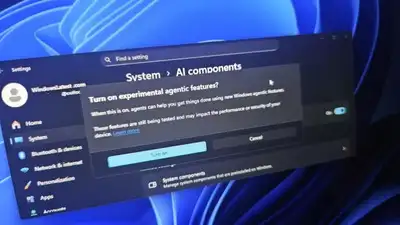
Source: Windows Latest
With Agent Workspace, Windows 11 takes a significant step toward becoming an AI-native operating system. The goal is to provide AI assistance that works locally, automates repetitive tasks, and increases productivity while allowing users to stay in control. However, giving AI agents access to personal files introduces privacy and security concerns. The feature is still experimental and limited to Windows Insiders, and user feedback will likely shape its development before a wider release. Microsoft aims to balance innovation with safety, ensuring AI agents enhance workflows without compromising trust. As testing continues, developers are also evaluating how well these agents handle sensitive data, potential misuse risks, and the need for clear user permissions to maintain transparency and accountability.
Microsoft is taking a major step toward making Windows 11 an AI-first operating system with its new experimental feature, Agent Workspace . This feature allows AI agents to run in the background with access to key personal folders, such as Documents, Desktop, Music, Pictures, and Videos, enabling them to perform tasks autonomously while users continue working on their normal desktop. Each agent operates in a separate, contained workspace with its own account, desktop, and permissions, ensuring a degree of isolation and control. the feature also raises potential security and privacy concerns While designed to enhance productivity by automating repetitive tasks. Currently available only to Windows Insiders, Agent Workspace marks Microsoft’s push to integrate AI more deeply into everyday computing. Agent Workspace is a separate, contained Windows session dedicated to AI agents. Each agent gets its own desktop, account, permissions, and runtime, allowing it to work independently without disturbing the user’s main desktop. Users can turn on this optional feature through Settings > System > AI Components > Experimental Agentic Features. Microsoft emphasises that this isolated workspace keeps agent actions auditable and controlled, ensuring you maintain visibility over what AI agents are doing. AI agents require access to local files and applications to perform tasks effectively. By using Windows’ Known Folders (Documents, Desktop, Downloads, Pictures, Music, Videos), agents can locate and manage files even if you’ve moved these folders elsewhere in your system. Microsoft designed Agent Workspace with security in mind. there are key differences: While it may seem similar to Windows Sandbox.